Queue Status
Last updated: 10 August 2026
Queue Status answers one question: is JudoNet keeping up?
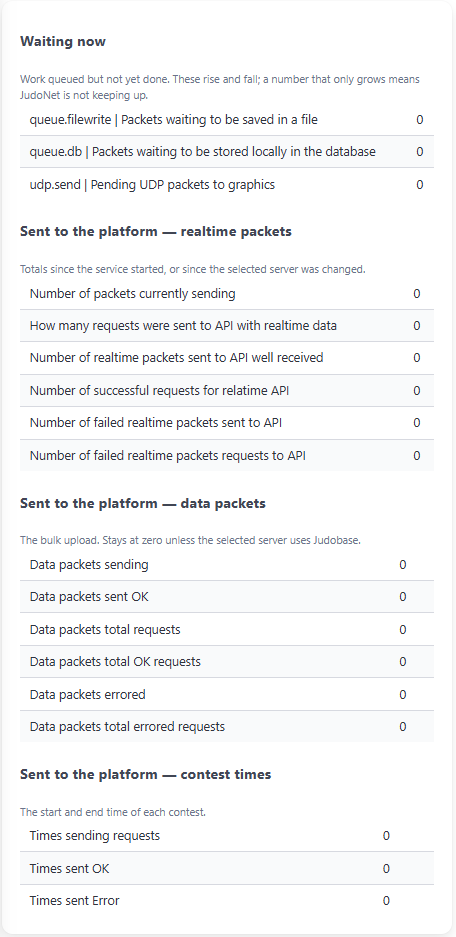
JudoNet does not do its work the instant a packet arrives. Packets go into queues and are dealt with in batches, which is what lets it cope with several mats reporting at once.
The page is divided into four blocks, and the first is different in kind from the other three:
| Block | What it tells you | How it behaves |
|---|---|---|
| Waiting now | How much work is queued but not yet done | Goes up and down. Should not keep climbing. |
| The three Sent to the platform blocks | How much has been sent, and how much failed | Only ever goes up. A large number is not a problem. |
Waiting now
Three queues.
| Queue | What is waiting |
|---|---|
| Packets waiting to be saved in a file | Packets queued to be written to the packet files on disk. |
| Packets waiting to be stored locally in the database | Packets queued for JudoNet's own database. |
| Pending UDP packets to graphics | Live data queued to broadcast to CG - JudoGraphics, on port 5000. |
Small numbers that keep changing are healthy. During a busy session the queues fill and empty constantly; a number of a few dozen that drops again a second later is JudoNet working normally.
A number that only grows is the warning sign. It means work is arriving faster than JudoNet can clear it, and something is wrong underneath — see when a queue is backing up.
Zero everywhere is also normal — during a break, or between sessions, there is simply nothing to do.
The graphics queue at zero does not prove anything is being received. JudoNet takes each packet off the queue and only then sends it to whichever network interfaces are enabled. If none is enabled, the packet is discarded at that point — the queue empties normally and reads zero, while nothing leaves the PC.
If CG - JudoGraphics is receiving nothing, check UDP send interfaces rather than this page.
Sent to the platform
The remaining three blocks are counters rather than queues. They only ever climb, so a large number means JudoNet has been busy, not that anything is wrong.
Realtime packets — the live stream of what the scoreboards are showing.
| Row | Meaning |
|---|---|
| Number of packets currently sending | How many are in the batch being sent at this moment. |
| How many requests were sent to API with realtime data | Total requests attempted. |
| Number of realtime packets sent to API well received | Packets accepted. |
| Number of successful requests for realtime API | Requests that succeeded. |
| Number of failed realtime packets sent to API | Individual packets the platform rejected. |
| Number of failed realtime packets requests to API | Whole requests that failed. |
Data packets — the bulk upload of stored packets.
| Row | Meaning |
|---|---|
| Data packets sending | Size of the batch currently being sent. |
| Data packets sent OK / errored | Individual packets accepted or rejected. |
| Data packets total requests / total OK requests / total errored requests | The same, counted as whole requests. |
These stay at zero on a JudoManager (JM) competition. The bulk upload only runs against Judobase (JB), and only while Store Online is on. Zeros here are not a fault at a national or club event.
Contest times — the start and end time of each contest.
| Row | Meaning |
|---|---|
| Times sending requests | Total attempts. |
| Times sent OK / Times sent Error | How many succeeded and how many failed. |
Reading the counters
Within each block the successes are listed first and the failures last, so the bottom of each block is where to look.
A red dot appears beside any failure count above zero. That is the thing to look for — you do not have to read the numbers themselves. Five rows can show it: failed realtime packets, failed realtime requests, errored data packets, errored data requests, and times sent in error.
A failure count that rose earlier and has since stopped rising is history, not a live problem — the dot stays because the total is still above zero. To tell the difference, watch whether the number is still climbing, and check Alerts and Errors, which reports the reason and clears when the problem resolves.
These counters reset to zero when a different JudoManager server is selected, because JudoNet reconnects to the platform from scratch. A page full of zeros just after you changed server is expected. The queues in the first block are unaffected.
When a queue is backing up
JudoNet raises an alert by itself once more than 100 packets are waiting in either the file queue or the database queue. You will see it on Alerts and Errors as well as here.
There is no automatic alert for the graphics queue. If that one starts climbing, this page is the only place it shows.
| Queue that is growing | Usual cause |
|---|---|
| Waiting to be saved in a file | The disk is slow, full, or something is scanning the folder. |
| Waiting to be stored in the database | The disk is slow or full, or the database has grown very large because it was never cleared between competitions. |
| Pending UDP packets to graphics | Sending is slower than data is arriving — typically many network interfaces enabled at once, or one that has stopped responding. |
What to check, in order:
- Free disk space on the JudoNet PC. This is the most common cause by far.
- Whether the database was cleared before this competition — see backing up and clearing.
- Antivirus scanning
C:\JudoNet. Real-time scanning of a folder being written to constantly slows it dramatically; excluding the folder is a normal thing to ask for. - For the graphics queue, UDP send interfaces on Live data — every enabled interface is sent to in turn, so enabling ones that are not needed makes the work larger.
A backlog is not cosmetic. Packets waiting in a queue have not been stored yet, and anything still queued when the service stops is lost. If a queue is growing, deal with it during the competition rather than after it.
What this page does not show
Broadcasting to FairReplay is not represented here — neither the markers and events on port 5001 nor the recorder data on port 5002. Those are queued internally like everything else, but no counter for them is displayed.
To check that side, use:
- Alerts and Errors — connection problems are reported there.
- The FairReplay Recorders section of Live data — a red status means inputs are not recording.
- The UDP log,
C:\JudoNet\logs\UdpSenderService\udp-<date>.log, which records the broadcasts themselves.